AI Automation
Accounts Payable Automation: The 5-Step Workflow UK Businesses Need
Accounts payable automation explained: the 5-step workflow, UK e-invoicing rules from 2029, software options, and real cost ranges for SMBs.
Key takeaways
- The workflow is five steps: capture, extract, match, approve, and pay and reconcile, in that order, and it's the same shape whether you buy a platform or build one.
- The core benefit is control, not just speed: consistent matching and approval rules cut errors and strengthen fraud checks as invoice volume grows.
- UK e-invoicing is coming: VAT e-invoicing becomes mandatory from April 2029, built on the Peppol network, so it's worth planning for now rather than retrofitting later.
- Dedicated platforms and workflow tools solve the same problem differently: Medius or Basware sell you a finished system, Zapier, Make, or n8n let you build one around Xero or Sage.
- Start with your worst bottleneck, not the whole ledger: pilot one automated step before rolling out the rest.
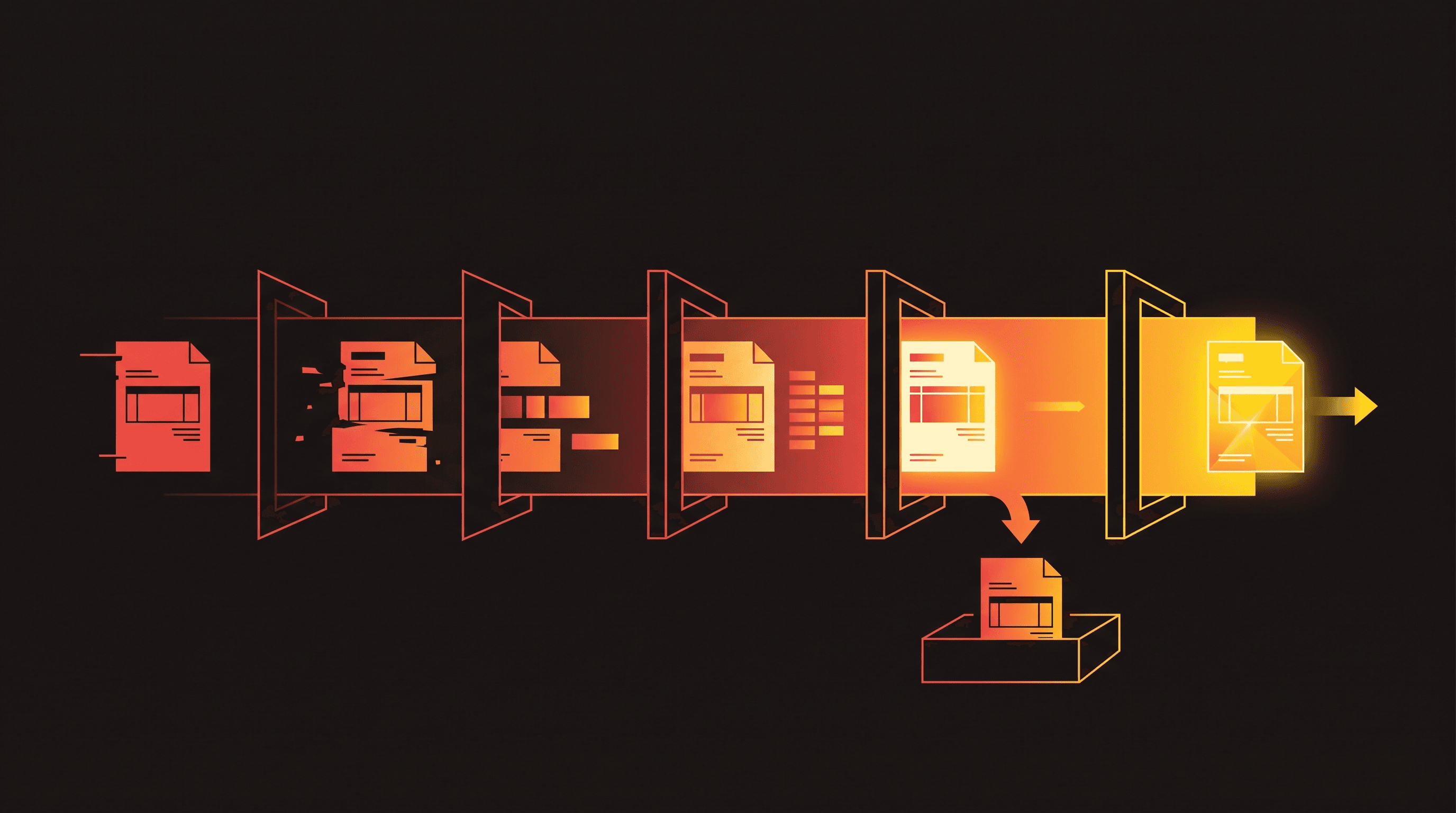
Accounts payable automation replaces manual invoice handling with a digital workflow that captures each invoice, extracts the data, matches it against a purchase order, routes it for approval, and pays and reconciles it automatically. If you're still keying invoices into a spreadsheet or chasing approvals over email, this is the fix: fewer manual errors, faster processing, and a payment run you can actually audit.
The shift makes sense once invoice volume outgrows what one person can safely process by hand. Below is the five-step workflow accounts payable automation actually runs on, what it costs to buy or build in the UK, and where the UK's incoming e-invoicing rules fit into the decision.
The 5-step accounts payable automation workflow
Every AP automation platform, from a five-person start-up's Make.com build to an enterprise Basware rollout, runs some version of the same five-step process. It's also the exact structure Google's AI Overview uses when it summarises this topic.
| Step | What happens | Where AI/OCR usually sits |
|---|---|---|
| Capture | The invoice arrives by email, upload, or supplier portal and enters the system as a document. | Email parsing and portal integrations route the file automatically. |
| Extract | Data gets pulled from the invoice: supplier, amount, VAT, line items, due date. | OCR and AI extraction read scanned PDFs and unstructured layouts. |
| Match | The invoice is checked against a purchase order and goods receipt, a three-way match. | Matching engines flag mismatches for a human to resolve. |
| Approve | The invoice routes to the right approver based on amount, department, or cost centre. | Rules-based routing; AI can suggest an approver on ambiguous invoices. |
| Pay and reconcile | Approved invoices join a payment run and get reconciled against the bank feed. | Payment scheduling logic; reconciliation matches payments back to invoices. |
The extract and match steps are where most of the manual hours disappear. A finance assistant keying invoice data by hand processes a limited number of invoices a day; OCR extraction with a matching engine behind it clears the same volume in minutes, leaving only exceptions for review. For the wider picture on where AI fits across finance, not just AP, see AI in accounting.
AP Automation Benefits for UK Finance Teams
- Lower processing cost per invoice: less manual keying and chasing means fewer hours spent per invoice processed.
- Shorter cycle time: invoices move from capture to payment in days, not weeks, once routing and matching happen automatically.
- Fewer errors: consistent matching rules catch discrepancies a tired reviewer might miss on invoice two hundred of the day.
- Stronger fraud control: duplicate invoices, altered bank details, and inflated amounts get flagged by the matching step.
- Audit trail and compliance readiness: every approval and match is logged, which matters for external audit and for the UK's incoming e-invoicing rules alike.
None of this is instant. The gains show up once the workflow is tuned to your actual invoice mix, which is why the rollout plan later in this guide starts with a pilot, not a full switch-over.
Accounts Payable Automation vs Manual AP: What Changes
| Task | Manual AP | Automated AP |
|---|---|---|
| Invoice capture | Emailed PDFs saved to a folder, or printed | Captured automatically from email, upload, or supplier portal |
| Data entry | Keyed by hand into the accounting system | Extracted by OCR/AI straight into the ledger |
| Matching | Checked manually against the PO, often skipped under time pressure | Three-way matched automatically, with exceptions flagged |
| Approval | Chased over email or chat | Routed automatically by rule, with reminders |
| Payment run | Built manually each cycle | Scheduled automatically once invoices are approved |
| Audit trail | Scattered across email and spreadsheets | Logged automatically against every invoice |
The biggest change with invoice automation: where the bottleneck sits. Manual AP bottlenecks at data entry and chasing approvals. Automation moves the bottleneck to setup: getting matching rules, approval hierarchies, and supplier data right up front. Get that right and the day-to-day workload drops sharply; get it wrong and you've automated the wrong process.
AP Automation and UK Compliance: MTD and E-Invoicing
UK accounts payable automation is about to gain a compliance dimension it didn't have before. HMRC and the Department for Business and Trade ran a consultation on standardising e-invoicing across UK businesses and the public sector in 2025, asking whether adoption should be voluntary or mandatory. Following that consultation, the government confirmed at the Autumn Budget that VAT e-invoicing will become mandatory from April 2029, with a detailed implementation roadmap due at Budget 2026. OpenPeppol, the network's own standards body, confirms that the government has selected Peppol as the interoperability network for the mandate, citing HMRC's Tax Update 2026 policy paper.
That's not this year's problem, but it is this year's decision point. If you're building or buying accounts payable automation software now, check that it, or its published roadmap, supports Peppol-based e-invoicing and structured data output rather than just OCR-and-email capture. Retrofitting a compliance layer onto a workflow built around scanned PDFs is a much bigger job than specifying for it up front. This sits alongside Making Tax Digital, HMRC's existing digital record-keeping requirement for VAT: AP automation that already keeps clean, structured digital records does most of the heavy lifting MTD expects.
AP Automation Software: Dedicated Platforms vs Workflow Tools
There are two honest ways to get an accounts payable automation workflow running, and most vendors on this topic sell one of them, not both.
Dedicated AP automation software, Medius, Basware, and HighRadius, gives you a finished system: invoice capture, matching, approval routing, and payment scheduling built in, often with connectors for SAP, Oracle, or NetSuite. You're buying speed to deploy and a support contract, at pricing every one of these vendors quotes on request rather than publishes.
The alternative is building the same five-step workflow with general automation tools connected to the accounting software you already run. n8n vs Zapier vs Make covers the trade-offs between the three in detail; for AP specifically, you'd typically pair an OCR/document-AI step for extraction with workflow automation tools like Make or n8n to move data and enforce matching and approval rules, with Xero or Sage as the system of record. It's cheaper and more flexible, but you own the setup and the maintenance when formats change.
Which one's right depends on invoice volume and how much capacity you have to maintain it. Under a few hundred invoices a month, a workflow-tool build is generally the better economics. Past a few thousand, or once you need multi-entity approval chains and audit-grade reporting out of the box, a dedicated platform starts paying for itself in time saved, not just software cost. The same build-vs-buy logic applies to adjacent back-office processes: see our CRM automation guide for how it plays out on the sales side.
How Much Does AP Automation Cost?
Accounts payable automation costs split into three brackets, and vendors are inconsistent about publishing any of them.
- Enterprise AP platforms (Medius, Basware, HighRadius and similar): quote-based, typically sold as an annual subscription scaled to invoice volume and user count. HighRadius's own pricing page is representative: no published rates, just tailored plans after a sales conversation. Medius and Basware follow the same pattern; budget for an implementation project on top of the licence.
- Mid-market and workflow-tool builds: if you're stitching the workflow together yourself, the automation layer is the main line item. Zapier's paid plans start around $19.99 to $49 a month depending on task volume, Make's paid plans start at $9 a month for 10,000 credits, and n8n's Cloud plans start at 20 euros a month for 2,500 executions, with a free self-hosted option if you run your own server. OCR/extraction add-ons and accounting software licences sit on top.
- In-house time: whichever route you take, budget real hours for setup, mapping approval hierarchies, matching rules, and supplier data before go-live, not just licence fees.
For the wider AI automation cost picture beyond AP specifically, our AI automation cost and pricing guide breaks down what UK SMBs are actually paying across builds like this.
Getting Started: A Practical Rollout Plan for UK SMBs
- Audit your current invoice volume and bottleneck. Count invoices per month and time how long capture, matching, and approval each take. You can't automate a step you haven't measured.
- Pick the highest-friction step to automate first. For most SMBs that's data entry or chasing approvals, not the whole workflow at once.
- Pilot before full rollout. Run the automated step alongside the manual process for one billing cycle and compare error rates and cycle time before switching over fully.
- Set matching tolerances deliberately. Too strict and every invoice becomes an exception; too loose and you've removed the fraud control the automation was meant to add.
- Measure cycle-time reduction against your own baseline, not a vendor's marketing number, before expanding the rollout.
Frequently asked questions
What is accounts payable automation?
Accounts payable automation is software that runs the invoice-to-payment process for you: capturing invoices, extracting the data, matching them against purchase orders, routing for approval, and scheduling payment. It replaces manual data entry and email-based approval chasing with a consistent, auditable workflow.
What's the difference between AP automation and invoice automation?
Invoice automation usually refers to the capture and extraction steps: getting invoice data off a PDF and into your system automatically. AP automation is the wider term, covering the full five-step workflow through matching, approval, and payment. In practice the terms overlap and vendors often use them interchangeably.
Is AP automation worth it for a small UK business?
It depends on invoice volume. Below roughly 50 to 100 invoices a month, a simple workflow-tool build may be enough. Past that, the manual cost in staff hours and error risk usually outweighs the setup effort, especially with the UK's e-invoicing requirements arriving from 2029.
Does AP automation software integrate with Xero or Sage?
Most dedicated AP platforms and workflow-tool builds connect to Xero and Sage as the accounting system of record, either through native integrations or via Zapier, Make, or n8n. Check integration depth before buying: some only push a summary journal entry rather than full invoice-level detail.
How does AP automation help with UK e-invoicing rules?
AP platforms that already output structured invoice data, rather than scanned PDFs, are better positioned for the UK's VAT e-invoicing mandate arriving from April 2029. The government has confirmed Peppol as the interoperability network for that mandate, per OpenPeppol's own announcement, so confirm any platform's Peppol roadmap directly with the vendor since rollout details are still being finalised.
Should I buy AP software or automate manually with workflow tools?
Buy a dedicated platform if you're processing thousands of invoices a month, need multi-entity approval chains, or want a vendor support contract. Build with workflow tools like Zapier, Make, or n8n if your volume is lower and you want more control over cost and customisation.
Whichever route fits your invoice volume, the setup work matters more than the accounts payable automation tool you pick. If you want a second opinion on buying a dedicated platform versus building the workflow yourself, or help getting either one built properly, get in touch.
Methodology
How we put this together: the five-step workflow, benefit categories, and UK e-invoicing details in this guide are drawn from HMRC and the Department for Business and Trade's public consultation and Budget announcements (linked inline), current vendor pricing pages for Zapier, Make, and n8n (checked at time of writing and subject to change), and Aristral's own experience building back-office and finance workflow automation for UK SMB clients. Aristral provides AI automation and workflow-build services, including accounts payable and finance automation, so treat this as practitioner guidance from an interested party. UK e-invoicing timelines and requirements are still being finalised: verify current status against live gov.uk and HMRC guidance, and check any vendor pricing cited against the vendor's own pricing page. No outcomes are guaranteed. Written by Taha Bilal, who founded Aristral in 2024 and runs delivery himself. Corrections to admin@aristral.com.
About the author
Taha Bilal
Co-founder, Aristral
Taha Bilal is a co-founder of Aristral, a UK AI automation and SEO agency based in Clifton, Bristol. He has been running SEO and digital-growth campaigns for SMB and SaaS clients since 2018, and now leads Aristral's combined SEO + GEO programmes for service businesses across the UK and US. Corrections and source requests: admin@aristral.com.
LinkedIn →Filed under: AI Automation